RunAs error 1327

I had a workmate with issues using privilege escalation this morning, he kept getting an error like this:

I had a workmate with issues using privilege escalation this morning, he kept getting an error like this:

RUNAS ERROR: Unable to run - cmd

1327: Logon failure: user account restriction. Possible reasons are blank passwords not allowed, logon hour restrictions, or a policy restriction has been enforced.

After googling around a bit, most of the responses were about group policy or other restrictions causing issues, but it was actually much simpler!

[Read More]
update-apt-xapian using excessive resources

I’ve had an issue with some of my Ubuntu VM’s lately destroying the available resources on my ESXi box. The hard drives were going crazy due to a combination of normal disk access and also memory paging into swap file.

Running top showed a process “update-apt-xapi” which was top of the charts for memory and cpu usage.

I googled around a bit, and found that the update-apt-xapian-index process is Ubuntu’s way of updating the synaptic indexing. Considering this is a cli-only vm where I use puppet to manage the packaging, it’s useless. Also, there’s many many many posts on the web about this package going mental on low-resource machines.

[Read More]

Maths square puzzle

Ok, I’m going to admit this one had me working for a few minutes with a pencil. RMB’s young son had gone to his dad for help with some maths homework, and they’d blasted through it with ease except for one question, which they eventually came to me with before calling shenanigans on the whole thing and proclaiming it broken:

O O O
O   O
O O O

In the circles above, take the numbers one through eight and arrange them so that each side of the square adds up to fifteen.

[Read More]

DHCPINFORM requests from Windows clients

I’ve had an issue where there every 100 seconds or so, I was seeing something similar to this showing in my ISC dhcp server logs:

Mar 16 23:50:06 dnsbox dhcpd: DHCPINFORM from 10.0.0.20 via eth0
Mar 16 23:50:06 dnsbox dhcpd: DHCPACK to 10.0.0.20 (00:19:d1:9f:aa:e6) via eth0

This was for every windows client on the network, luckily I’ve only got two or three at any given time 🙂

It took me a while to figure out, but it seems it’s actually Windows doing its automatic proxy auto-discovery (WPAD). If the DHCP server doesn’t respond with a “valid” response, it just keeps asking.

[Read More]

Killing processes in OSX while tethered via WiFi

When I’m at work I tether my laptop to my mobile phone. Only having 1.5GB of data per month to use, this can get eaten up quickly with Dropbox and or SugarSync working, not to mention other things that use the data.

Dropbox has a manual “pause” button, but SugarSync doesn’t. Since I’ve changed it’s even harder to remember that things are syncing, so I looked for a way to kill it while I’m tethered.

[Read More]

Stupid Surveys

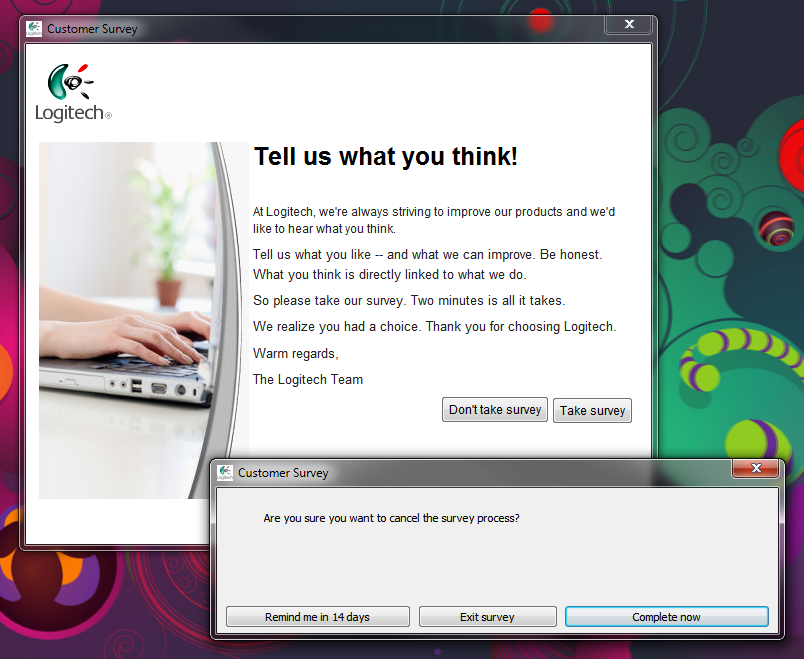
Ok, seriously Logitech. I installed your terrible software to try and make my mouse buttons mappable, and that didn’t go so well. Why can’t I just set it to a key, or a key combo without having to learn your weird macro functions? Your old software was good, now… not so much.


And after I reboot, I get asked about a survey. I say no, because I don’t want to fill it out. Then you bug me again? How is this good interface design? I’ve got two dead mice from you (a G5, and now an Anywhere MX which drifts all over the place) and you’re bugging me about a survey?

[Read More]

My First Open Source Project

Every day I make use of literally hundreds of interlinked projects which come under the banner of open source or free software.

I started writing this article on a phone powered by Android, in the Epistle editor, in the markdown format. The router I’m connected to is based on Linux, and I will post this onto my blog powered by WordPress. My house has at least twenty virtual machines running Ubuntu, on an ESXi host, providing a range of internal and quasi-external services with 99% of them being free software solutions. About the only software I pay for is games, operating systems and things that Atlassian sells (I’m falling more in love with them all the time!)

[Read More]

Removing Pesky Sidebar Places in OSX

I had an issue with the sidebar of my OSX Finder window in Snow Leopard. Even though the old folders were there (and later removed) some shortcuts I had created wouldn’t go away.

Command-clicking and trying to remove it wouldn’t work, and dragging it away wouldn’t either. I finally got annoyed by them being there, so I started googling around a bit.

I found this discussion on the official Apple Support Community which led me to Command-Click and Dragging the items into the trash.

[Read More]

HP DC7800 with NVS300 on Windows 7

If you install an NVS300 supplied by HP it’ll disable the onboard SoundMAX hardware because there’s a sound device built into the video card.

I tried a lot of things, including nVidia’s downloadable driversHP’s drivers and a few other options but eventually found it was a BIOS setting issue.

  • Go into the BIOS (F10 on startup)

  • Scroll across to Advanced

  • Select PCI Devices

  • Once you’re in there, you’ll see the following:

  • The trick is to press the Page Down key and you’ll get to see the second set of PCI Devices:

    [Read More]

Latin Macrons in Word 2003

So, you’re wanting to type some Latin notes quickly, but you’re sick of using the numeric keypad or you’re unable to because your laptop hates you. Here’s a good way to work around it, by having buttons to insert the text into the current point you are at in the document!

  • Right click and Save-As on this link to download the file - this is all the magic code to make this work.
  • Open Word 2003.
  • From the main screen, press the key combination Alt-F11.
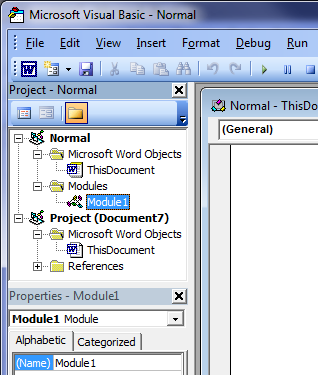
  • Ensure you’re working on the Normal template, by double-clicking on Normal then Microsoft Word Objects then ThisDocument.
  • Right click on the Normal title and click Import File…
  • Select the file and click Open.
  • This should import the file into a Module called Module1 or similar, double click on Modules then double click on the newly created module item.
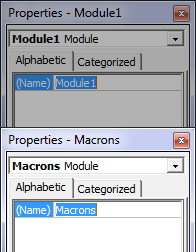
  • To rename it so we know what we’re dealing with, go down to the module properties (which should be in the bottom left) and click next to (Name).
  • Delete what’s in the box and rename it to Macrons.
  • Hit enter and it’ll update the name.
  • Click on the Save icon in the top of the window to confirm the changes to the Normal template.
  • Close the Microsoft Visual Basic window and you’ll be back in Word
  • Click on View -> Toolbars -> Customize…
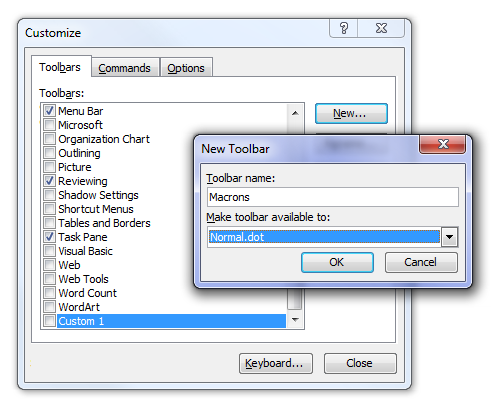
  • Go to the Toolbars tab and create a new toolbar by clicking on New… and giving it a name. Ensure you’ve set Make toolbar available to: to Normal.dot.
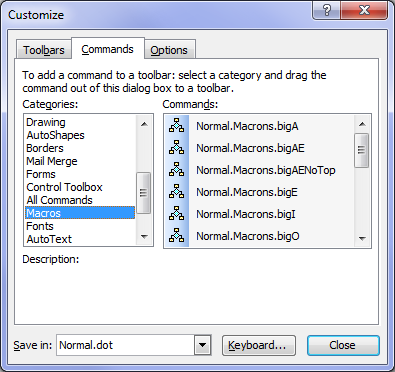
  • Change to the Commands tab.
  • Scroll down in the left hand window and find Macros then click on it.

For each of the Commands in the right hand side which start with Normal.Macrons.:

[Read More]