A great one from Fishpond. I’ve only ever bought one of the science books from them, and I was a little puzzled by one of their suggestions.

A great one from Fishpond. I’ve only ever bought one of the science books from them, and I was a little puzzled by one of their suggestions.
Taken from the information page here on the Qld Police site.
As of 2 April 2012, laser pointers with a power output of greater than 1 milliwatt (1mw) will be restricted items requiring reasonable excuse for lawful possession thereof.
‘Reasonable excuse’ for possession of a laser pointer includes: Firearms Licence holders.
“The person holds a licence that authorises possession of a firearm in relation to which the laser pointer may be used, and the laser pointer has a power output of less than 10 milliwatts.” (10mw)
[Read More]
According to this article on WLB’s news page, they’re changing the format of new licences. It’s nice to see they’re putting some security features into the card.
Previously I think you could probably have printed them out on any ID card printer, making it much easier to make illicit purchases of ammunition and other goods.
Additional features will include:
If you’re attempting to monitor servers that aren’t on the same domain as your Root Management Server you need certificate-based authentication to allow communication between hosts.
There are plenty of articles on how to setup a Certification Authority, we’re running a standard Windows 2008 setup.
Here’s our Standard Operations Procedure for replacing certificates on agents.
https://[your root ca]/certsrv/ in a web browserhttps://[your root ca] in the Add this website to the zone fieldDownload a CA Certificate, certificate chain or CRLCurrent highlightedDER.Download a CA CertificateInstall certificate on the general pagePlace all certificates in the following store and click browseTrusted Root Certification Authorities and click OK, then next and Finish.Home in the top rightRequest a certificateAdvanced certificate requestCreate and submit a request to this CA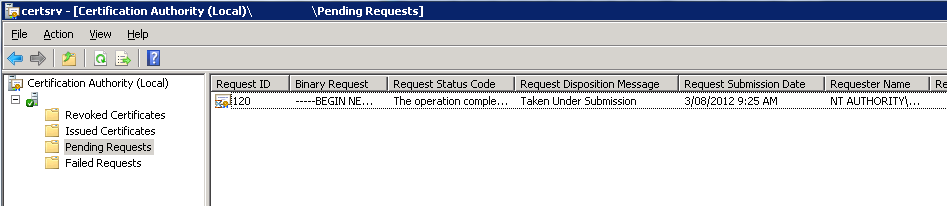
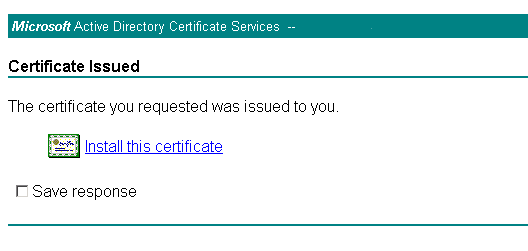
File -> Add/Remove Snap InCertificates and select theMy user accountoption.`Certificates but this time select Computer account then Local computer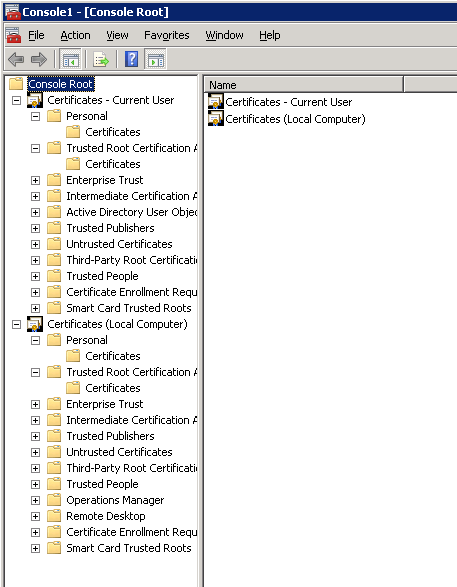
Certificates – Current user -> Personal -> Certificates you’ll find the client certificate.Certificates (Local Computer)Certificates – Current user -> Trusted Root Certification Authority you’ll find the root CA certificate. It should have the same name as the Root CA hostname.Trusted Root Certification Authorities folder under Certificates (Local Computer) and right click->paste the cert into there.Certificates (Local Computer) -> Personal -> Certificates and on the certificate you just dragged in there, then Right click -> All Tasks -> ExportMOMCertImport.exe [keyfile], substituting [keyfile] for the filename that you just exported.I posted recently about the fact that HTC had released a software update that they believed would fix the flickering issues that most HTC One X owners are experiencing. The update’s been available in Europe for a while, but Oceanic users have been waiting for it to be released OTA.
I woke this morning to an exciting sight (living by myself, I’m easy to please):
[Read More]I’ve had my I’ve had my for a few months now, and I’m loving it. It’s been through some seriously wet days on my motorbike, dumped into the sink for fun and generally bashed around. When I replaced my oversized Oakley wallet with the billfold, I dumped quite a lot of extra membership/loyalty cards into a pocket on my bag. I’ve been looking for a simple card holder since then - who wants things floating around in your bag - and recently I found my first test subject.
[Read More]Thursday, May 17, 2012
What are your favorite foods to throw on the grill?
Well, since I have a BBQ instead of a grill, maybe Steaks? I’m quite partial to well-cooked Salmon, but haven’t done that yet.
Wednesday, May 16, 2012
What was the last live performance you saw?
I’m fairly sure it was the very last Powderfinger concert at the Riverstage, it was quite amazing.
Tuesday, May 15, 2012
[Read More]Another meme from my friend Barry…
What it took to get an 8th grade education in 1895…
Remember when grandparents and great-grandparents stated that they only had an 8th grade education? Well, check this out. Could any of us have passed the 8th grade in 1895?
This is the eighth-grade final exam from 1895 in Salina , Kansas , USA . It was taken from the original document on file at the Smokey Valley Genealogical Society and Library in Salina , and reprinted by the Salina Journal.
[Read More]Another silly meme from my mate Barry.
… confirming that 1.29.xxx.11 will recalibrate the screen over the course of a few days …
HTC believes that through their testing of the new update they’ve found a fix for the screen flickering issues that HTC One X owners have been experiencing as mentioned in my previous posts.
I hope this is true, and I’m still waiting on Optus to release the version, but many UK and European users should have it available as an Over The Air update. Luckily my (replacement) handset isn’t suffering the screen flickering issue yet, but I’m eagerly awaiting the promised update.
[Read More]