A quick note for my future self or someone else that comes along, if your BLTouch v3.x decides to start crashing into the bed, or is doing that either way - the black/white wires are backwards…
[Read More]Course Syllabus for Making New Friends as an Adult
I wish a semi-sane version of this was real, to be quite honest.
Course Objectives
Making new friends as an adult is difficult, especially for students who have just turned thirty and are approaching the precipice of death. This class will teach you how to navigate this emotionally demanding field, so that you can finally make new friends who will never find out about that one time you ate mulch for seven dollars.
[Read More]
Automatic RDP Certificate on Windows 10 Pro With LetsEncrypt
I’m sick of the “this doesn’t have a certificate” warnings. I:
- have a Windows 10 Pro machine
- want to use a LetsEncrypt certificate for RDP connections.
- don’t have an AD/IPA/whatever domain to join
- have the machine’s hostname in Cloudflare DNS
In this example I’ll use workstation.example.com as the hostname I’ll connect to, change this for your own hostname.
- Install CertifyTheWeb.
- Copy this powershell script to somewhere you won’t delete it (eg.
c:\scripts\update_rdp_certificate.ps1):
# this grabs the certificate thumbprint and tells RDP to use it
$HOSTNAME="workstation.example.com"
$THUMBPRINT = (ls Cert:\LocalMachine\my | WHERE {$_.Subject -match $HOSTNAME } | Select -First 1).Thumbprint

if (!$THUMBPRINT) {
    write-host "Failed to find certificate thumbprint for ${HOSTNAME}, quitting."
} else {
    write-host "Found certificate thumbprint for ${HOSTNAME}: ${THUMBPRINT}"
    write-host "Configuring RDP"
    & wmic /namespace:\\root\CIMV2\TerminalServices PATH Win32_TSGeneralSetting Set SSLCertificateSHA1Hash="$THUMBPRINT"
    write-host `Done!`
}
- Open CertifyTheWeb.
- Register a contact for LetsEncrypt with some contact details under both the normal and
testmodes. Test mode is enabled by clicking on the advanced tab and ticking theUse staging Mode (Test Certificates)box. - Click New Certificate.
- Select
Certificateon the right if it’s not already selected. - In the
Domainstab , enter the full hostname you’ll use to connect to the machine. ie.workstation.example.com. Remember to click the green+next to the domain name to add it to the list.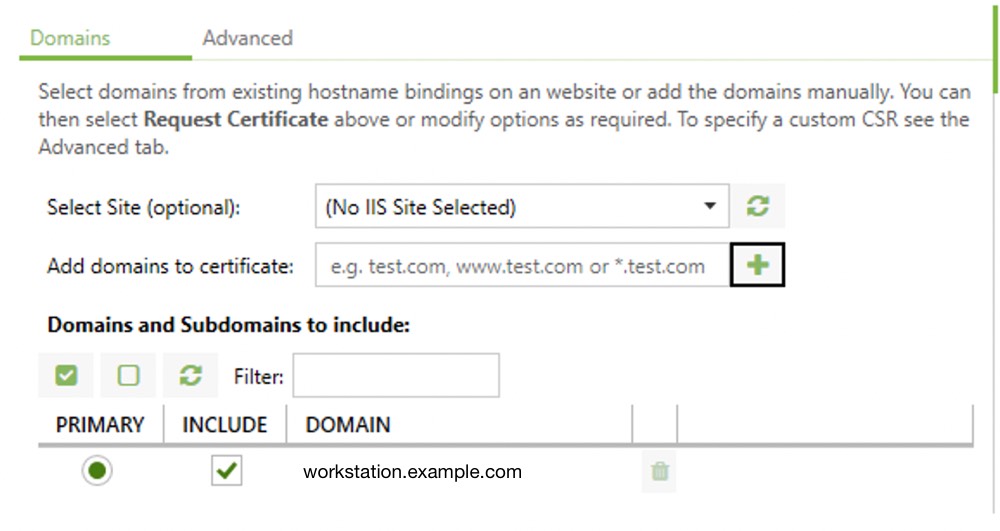
- On the
Advancedtab, set the Certificate Authority toLetsEncrypt. Until you’re sure everything works, tick theUse staging Mode (Test Certificates)box. - Click on Authorisation on the right.
- Change the
Challenge Typetodns-01and the DNS Update Method toCloudflare DNS API. - Add the a new Credential Cloudflare API token.
- You’ll need to give it permission to edit the DNS zone you want to issue certificates for.
- Select the Zone you want to issue the certificate under by clicking the
...next to DNS Zone ID and selecting the zone name. - Click
Deploymenton the right. - Set the Deployment Mode to
Certificate Store Onlysince we won’t be assigning this to any IIS Websites. - Click
Taskson the right and add a Deployment Task ofRun PowerShell Script. - On the Task Parameters tab, set the Program/Script to the path of your script (eg.
c:\scripts\update_rdp_certificate.ps1). - Click
Previewon the right and check everything seems OK.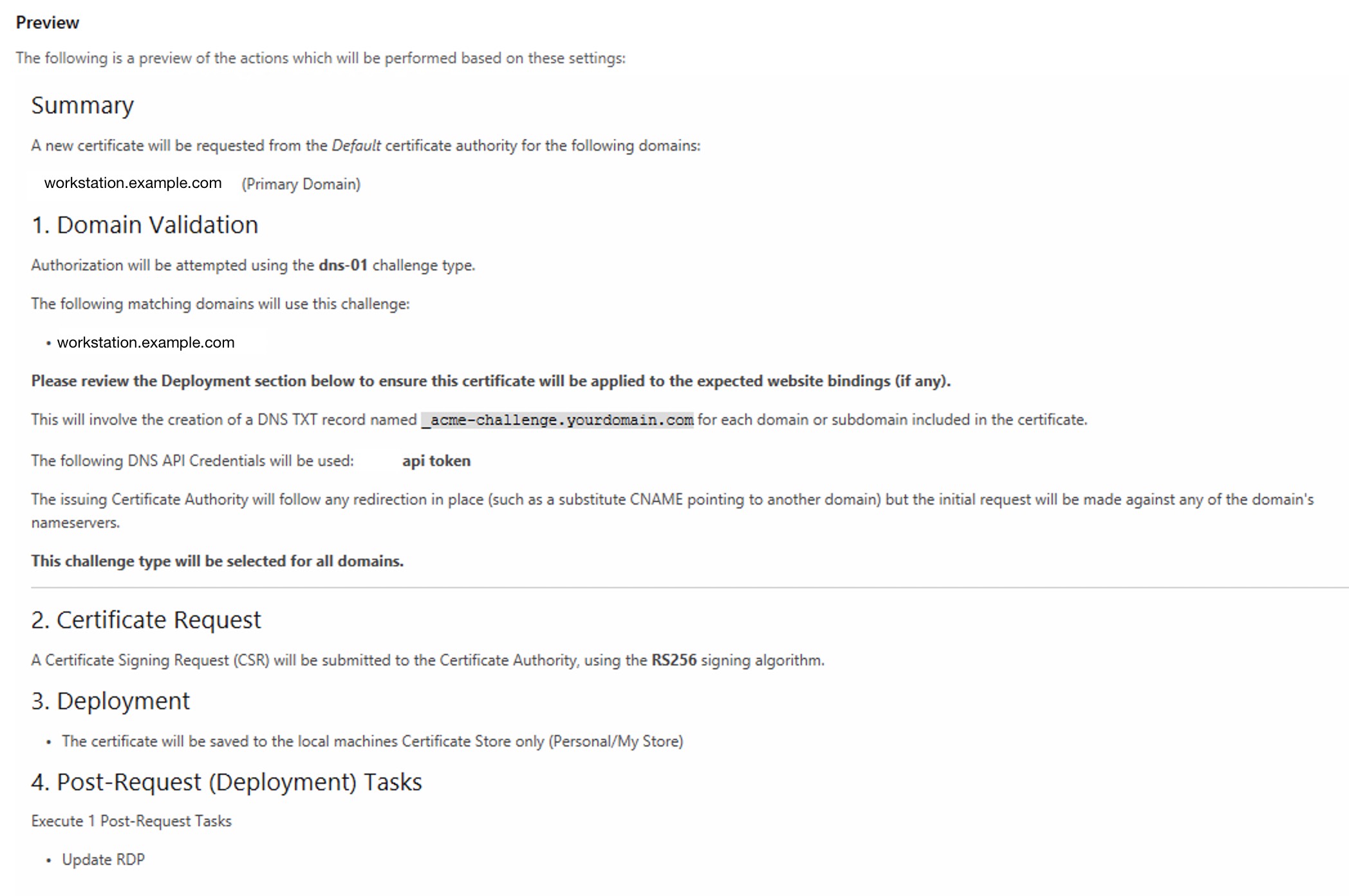
- Click
Testto make sure things work the way they should. - Click
Request certificateand see how it works!
Remember to set the authority back to the production one and re-issue when you’re done. :)
[Read More]Design vs Implementation
I’m trying to make a small pogo-pin jig so that I can program the ESP8266’s that make up a lot of projects I play with. Similar to the design in the article “Pogo Pins Make Light Work of IoT Switches”, I want some modules I can clamp over the top of things like the Sonoff Basic R3 or the D1 Mini without soldering on wires or pins.
The one I’m having the most fun with lately is the DETA wall switches - I can’t stand doing fiddly OTA updates - serial flashing my favourite build is just easier. Soldering on a low profile pin header is a pain in the arse, especially if you do it just wrong and the unit won’t go back together. There’s also the fact that there’s a mains-voltage module this faceplate plugs into, and I really don’t want to short on that.
[Read More]Disappointing Padlocks
I have some tool boxes that have ammunition in them and I’m not exactly sure where they keys are. I figured I’d set myself the challenge to open them with the lock picks I bought years ago and never used.
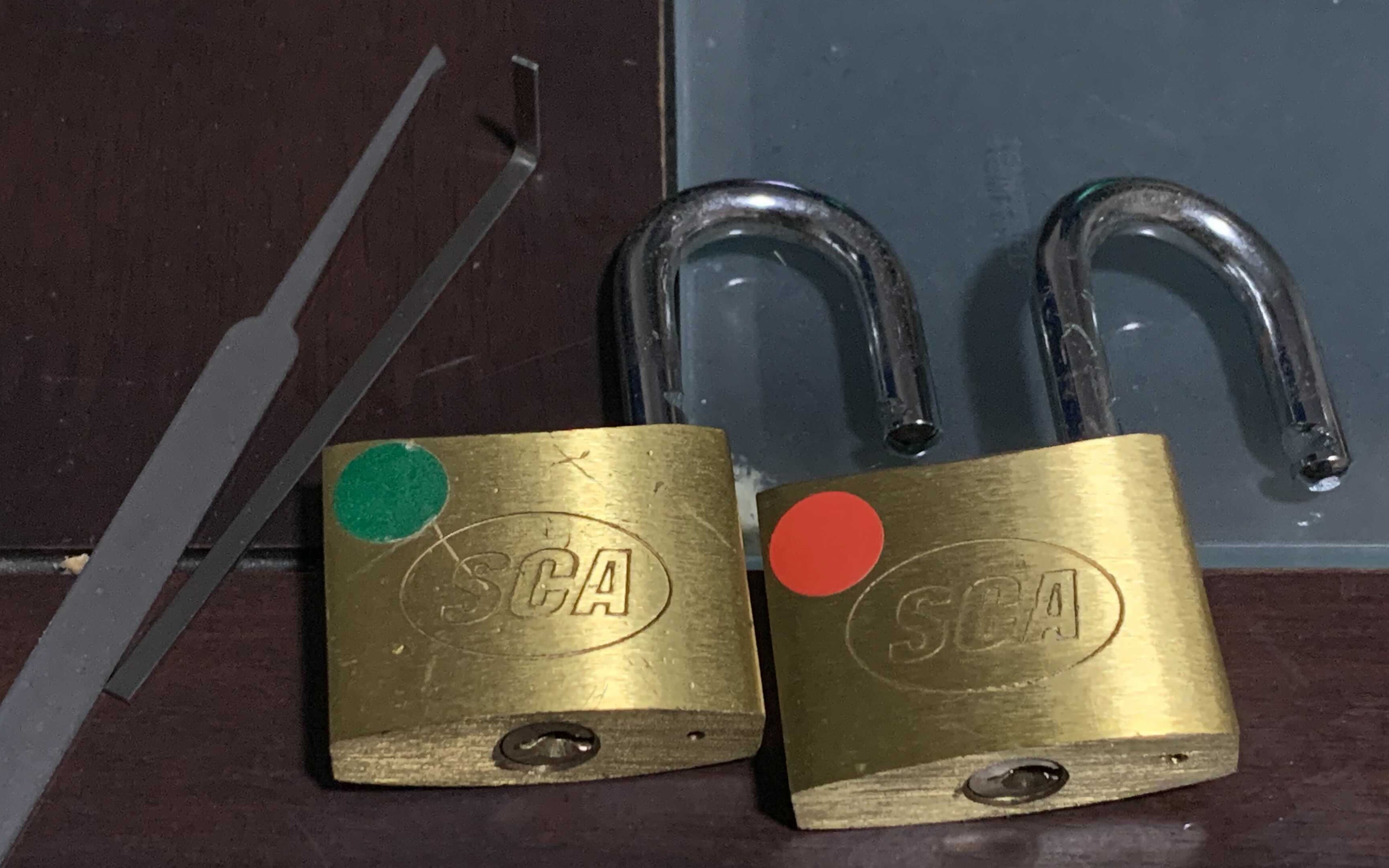
Literally pushed a pick all the way in once and the first lock popped open. Laaaame. Second one took about ten seconds of random jiggling. The LockPickingLawyer would be suitably ambivalent about them - I didn’t expect much from home-brand locks I bought from a place literally called “Super Cheap Auto”
[Read More]Monitoring cloudflared for fun and profit
This is a very hacky script for monitoring cloudflared, it requires curl and jq, which I think you should have on there anyway
You need the following line in the config.yml file, which sets cloudflared to expose the metrics/monitoring endpoint, or --metrics localhost:40355 on the command line:
metrics: localhost:40355
And… here’s the script. TL;DR, it checks the /ready endpoint, which returns {"status":200,"readyConnections":4} on good, or a 503 on not-working.
#!/bin/bash

SYSTEMD_TOPIC="cloudflared_monitoring"
METRICS_PORT="40355"
CLOUDFLARED_STATUS="$( curl --silent --max-time 5 "http://localhost:${METRICS_PORT}/ready" | jq -r '.status' )"
if [ "$CLOUDFLARED_STATUS" -ne 200 ]; then
    echo "cloudflared status: ${CLOUDFLARED_STATUS} restarting." | /usr/bin/systemd-cat -t "${SYSTEMD_TOPIC}"
    /bin/systemctl restart cloudflared 2>&1 | sudo /usr/bin/systemd-cat -t "${SYSTEMD_TOPIC}"
else
    echo "cloudflared status: ${CLOUDFLARED_STATUS} OK" | /usr/bin/systemd-cat -t "${SYSTEMD_TOPIC}"
fi
References
- Found the information in cloudflare/cloudflared#188.
- Committed to the cloudflared repo in 38fb0b28b.
- Argo command line option reference
Apple M1, terraform and golang
I was trying to apply a messy terraform config recently and kept running across an issue where the AWS provider would seemingly just get itself hung, using ~150% CPU. Killing it, deleting the terraform.tfstate and init/refresh/apply seemed to make it work sometimes. I thought I was having network connection issues, as it’d hang in random parts of a refresh or something like that.
The cause
Turns out it’s an issue with Rosetta 2 and golang fighting. There is more information in this comment from the Apple Developer-Ecosystem-Engineering account, where Rosetta’s handling of signals isn’t complete, but which has been fixed in recente versions of Rosetta.
[Read More]Facebook Messenger weirdness on macOS
I’m stuck using Facebook Messenger, and they love trashing system performance in the browser, so I tried the “native” macOS app recently.
I’m not sure what I did, but after posting a sick medieval meme, it started reloading itself over and over. Kill, open, repeat - it just hung. Stuck cache? This is starting to turn into a theme…
I figured deleting cache things worked last time, let’s try it again…
rm -rf "./Containers/com.facebook.archon/Data/Library/Application Support/Messenger/Partitions/*"
Opened, and it was OK again. Sigh.
[Read More]IPA and the Stuck Cache
Went to grab a krb ticket today, and this was a fun error to get. I checked all the usual timestamp things… nothing wrong there.
[yaleman@ipaserver 15:41 ~]$ kinit
Password for yaleman@IPA.REALM:
kinit: Clock skew too great while getting initial credentials
It wasn’t happening for anyone else, and it was working earlier, so that’s weird.
This was the error in the log files, that someone helpfully grabbed:
Dec 10 15:45:08 ipaserver.ipa.realm krb5kdc[7208](info): preauth (encrypted_timestamp) verify failure: Decrypt integrity check failed
Dec 10 15:45:08 ipaserver.ipa.realm krb5kdc[7208](info): AS_REQ (4 etypes {18 17 16 23}) 10.0.0.5: PREAUTH_FAILED: yaleman@IPA.REALM for krbtgt/IPA.REALM@IPA.REALM, Decrypt integrity check failed
I found a thread on the Kerberos mailing list about that error, which gave me some things to try.
[Read More]AWS on Hosting Your Own DNS Services
Having just built a cluster of PowerDNS Authoritative servers in AWS, behind the Global Accelerator product, this AWS Security Blog Post gave me some great confirmation that I did things properly! 🧐
[Read More]